Commission Tracking Spreadsheet: Free Template + When to Upgrade
Download a free commission tracking spreadsheet for Excel or Google Sheets. Covers structure, formulas, audit trails, and 4 signals it's time to switch to software.
A commission tracking spreadsheet is the right starting point for most sales teams. For a 5-rep team on a flat rate, it handles the job cleanly. For a 20-rep team with tiered plans, a CSM layer, mid-year quota adjustments, and reps asking daily about their earnings — the spreadsheet is creating more work than it saves.
This guide gives you a ready-to-use commission tracking template for Google Sheets or Excel, explains what to track and how to structure the data, and maps out when software is actually worth the switch.
What a commission tracking spreadsheet needs to track
Commission tracking is not just commission calculation. Calculation is applying a rate formula to a deal. Tracking is maintaining a complete, auditable record of what each rep earned, when, and why — across pay periods, plan changes, and personnel changes.
A working tracker records:
- Who closed it — rep name, and split percentage for co-sells
- When it closed — close date and the pay period it falls into
- How much — recognized revenue, not just deal value
- Which plan applied — the commission rate at the time of the deal, not today's rate
- What was paid — net payout after adjustments, clawbacks, or ramp rates
- History — prior periods preserved so you can answer "what did she earn in Q3?" twelve months later
Most tracking failures happen because the spreadsheet records current state without preserving history. When you update a commission rate for Q2, Q1 deals should not recalculate. The structure below solves this by design.
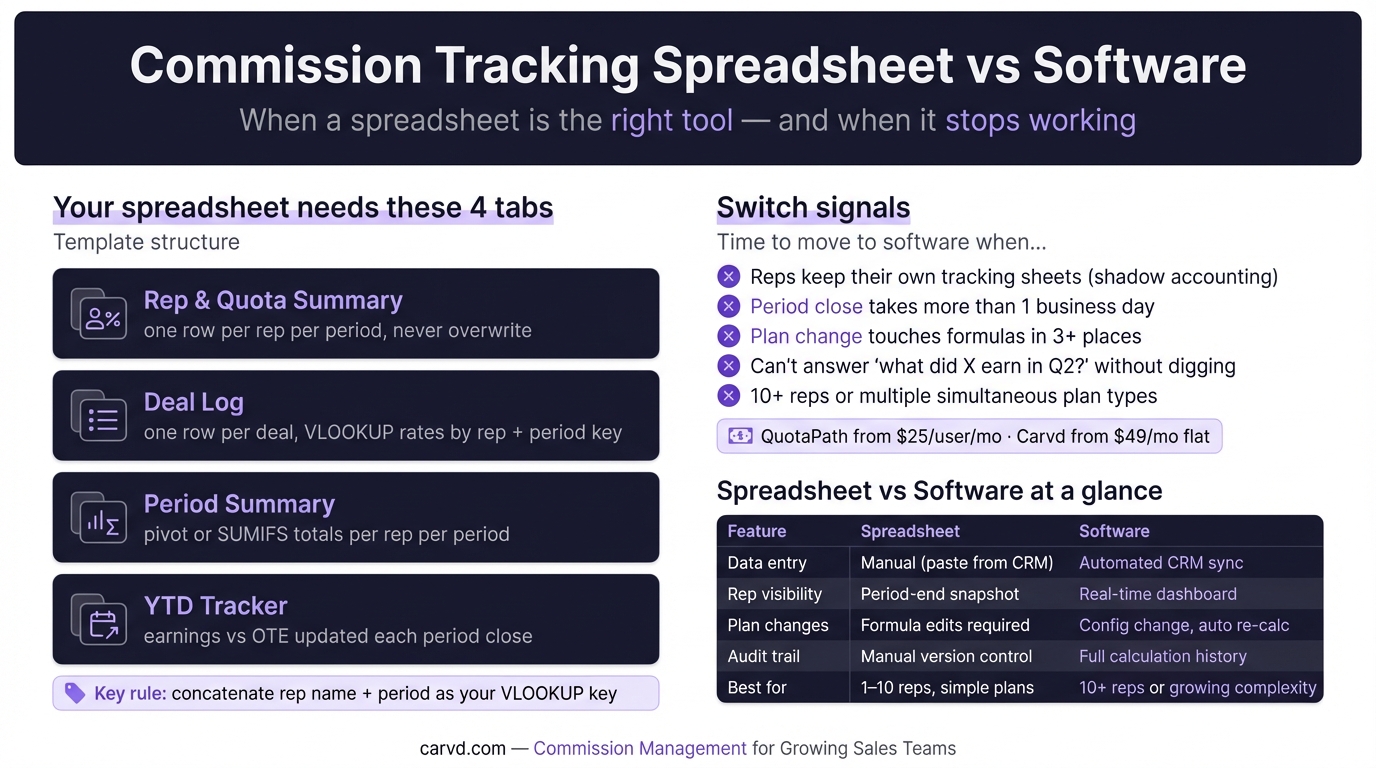
The template: four tabs
Tab 1: Rep & Quota Summary
One row per rep per period. This is the plan of record for each rep's quota and commission rates at any given time.
| Rep Name | Period | Quota | Rate 0–100% | Rate 100–125% | Rate 125%+ | Ramp % | Notes |
|---|---|---|---|---|---|---|---|
| Leila Santos | Q1 2026 | $200,000 | 8% | 12% | 16% | 100% | Full plan |
| Marcus Webb | Q1 2026 | $250,000 | 9% | 13.5% | 18% | 100% | Full plan |
| Jordan Park | Q1 2026 | $150,000 | 9% | 13.5% | 18% | 75% | Month 3 of ramp |
| Leila Santos | Q2 2026 | $220,000 | 8% | 12% | 16% | 100% | Quota adjusted |
Key rule: Never overwrite an existing row. When rates or quotas change, add a new row for the new period. Historical deals always look up the correct plan version. Need a better template? Stackrows has industry-specific ones, or try the commission spreadsheet template for a lighter-weight starting point.
Add a lookup key column (hidden or visible) that concatenates rep name and period: =A2&" | "&B2. This is what the deal log references for VLOOKUP.
Tab 2: Deal Log
One row per deal, per rep. This is the source of truth.
| Deal ID | Rep Name | Close Date | Period | Revenue | Split % | Plan Key | Commission Rate | Commission Earned | Clawback | Net Commission |
|---|---|---|---|---|---|---|---|---|---|---|
| OPP-001 | Leila Santos | 2026-01-14 | Q1 2026 | $75,000 | 100% | `=B2&" | "&D2` | =VLOOKUP(G2,RepSummary!$I:$J,2,0) | =E2*F2*H2 | $0 |
Column notes:
- Split % defaults to 100%. For co-sells, enter each rep's share (70%, 30%).
- Plan Key concatenates rep name and period — formula:
=B2&" | "&D2. Matches the lookup key on Tab 1. - Commission Rate is a VLOOKUP using the plan key — never hardcoded. Rate changes for future periods don't touch past rows.
- Commission Earned = Revenue × Commission Rate × Split %. For tiered plans, replace with the tiered formula below.
- Clawback — enter the recovery amount manually with the original deal ID and reason in a notes column.
- Net Commission = Commission Earned − Clawback.
Tab 3: Period Summary
One row per rep per period. Build this with SUMIFS, or use a pivot table on the deal log.
| Rep | Period | Revenue | Quota | Attainment | Total Commission | Status |
|---|---|---|---|---|---|---|
| Leila Santos | Q1 2026 | =SUMIFS(DealLog!E:E,DealLog!B:B,A2,DealLog!D:D,B2) | (VLOOKUP from Tab 1) | =C2/D2 | =SUMIFS(DealLog!K:K,DealLog!B:B,A2,DealLog!D:D,B2) | Approved |
The Status column (Draft → Reviewed → Approved) creates a lightweight audit trail. Only Approved rows should feed payroll.
Tab 4: Year-to-Date Tracker
One row per rep, updated each period close.
| Rep | Q1 Payout | Q2 Payout | Q3 Payout | Q4 Payout | YTD Total | Annual OTE | YTD vs OTE |
|---|---|---|---|---|---|---|---|
| Leila Santos | $18,400 | — | — | — | $18,400 | $80,000 | 23% |
Reps and managers can see year-to-date earnings against OTE without waiting for end-of-year reporting. This tab tends to generate the most rep questions — and it's the one most teams rebuild from scratch after losing visibility through the year.
Tiered commission formula
For a three-tier plan (base rate below quota, first accelerator at 100–125%, second accelerator above 125%):
=MIN(Revenue, Quota) * Tier1Rate
+ MAX(0, MIN(Revenue, Quota*1.25) - Quota) * Tier2Rate
+ MAX(0, Revenue - Quota*1.25) * Tier3Rate
Where Revenue is the recognized revenue for this deal (net of split), and Quota, Tier1Rate, Tier2Rate, Tier3Rate are all VLOOKUP'd from Tab 1 using the plan key.
| Term | What it calculates |
|---|---|
MIN(Revenue, Quota) | Revenue at or below quota (Tier 1) |
MAX(0, MIN(Revenue, Quota*1.25) - Quota) | Revenue between 100%–125% of quota (Tier 2) |
MAX(0, Revenue - Quota*1.25) | Revenue above 125% of quota (Tier 3) |
Never hardcode rate values in this formula. If rates change next quarter, the old periods must still calculate at the old rates — which only works when the formula looks up rates by period key.
For the full formula reference including flat-rate, unit-based, and margin-based plans, see commission formulas for every plan type.
How to track clawbacks
A clawback occurs when a commission paid in a prior period is recovered — typically because a customer churned, a deal was revised, or a payment failed.
How to record it:
- Enter the clawback in the current period, not the original period. Don't restate history.
- Add a deal log row with zero (or negative) revenue and the clawback amount in the Clawback column. Reference the original deal ID in Notes.
- The Period Summary for the current period automatically nets the clawback.
What not to do: Don't edit the original deal row. Modifying past periods makes it impossible to reconcile what was actually paid against payroll records.
Common tracking mistakes
Lookup key by rep name only. VLOOKUP on rep name returns the first match — which may be Q2's rate, not Q1's. Fix: concatenate rep name and period as the key. Every row in the plan summary needs the same concatenated key.
Overwriting past periods. When quota changes for Q2, some managers update the existing Rep Summary row. Every Q1 deal then recalculates at the wrong rate. Add a new row; never overwrite.
Tracking deals but not payments. A deal closes in December. Commission is calculated and approved. But when was it paid? If the spreadsheet doesn't distinguish Calculated from Approved from Paid, you can't answer payment-timing questions without checking payroll separately.
Hardcoding rates in payout formulas. When rates change, every cell with a hardcoded value needs a manual update. One missed cell produces a wrong payout that takes hours to find.
One plan row for all reps. When a new rep joins at a different rate mid-quarter, the plan summary needs its own row — not a new column or a new tab. The one-row-per-rep-per-period structure handles new reps, rate changes, and ramp schedules without restructuring the whole file.
When a spreadsheet stops working
The tracking problem shows up before the calculation problem. The signals:
Reps keep their own tracking sheet. When reps maintain a personal copy of the deal log to verify their payout — what ops teams call shadow accounting — the spreadsheet has already failed its core job.
"What did X earn in Q2?" requires manual research. If period-end reconciliation deleted or overwrote prior data, historical queries can't be answered without piecing together past exports.
Concurrent edits cause conflicts. Google Sheets handles simultaneous edits better than Excel, but it doesn't prevent conflicting changes to the same row. The last save wins, silently.
Period close takes more than a business day. When closing commissions requires significant manual reconciliation before numbers can go to payroll, the spreadsheet is adding cost, not removing it. A payroll export feature in commission software eliminates that reconciliation step entirely.
Plan changes touch formulas in more than three places. At that point, spreadsheet maintenance becomes a dedicated ops responsibility — which defeats the purpose of a lightweight tool.
Spreadsheet vs commission tracking software
| Spreadsheet | Commission software | |
|---|---|---|
| Data entry | Manual (CRM export → paste) | Automated CRM sync |
| Rep visibility | Period-end snapshot | Real-time dashboard |
| Plan changes | Formula edits required | Config change, auto re-calc |
| Audit trail | Manual version control | Full calculation history |
| Dispute resolution | Hours of investigation | Click to show derivation |
| Cost | Free | $25–$199/month |
| Implementation | Hours to days | Days to weeks |
| ASC-606 support | Manual export + reprocess | QuotaPath, CaptivateIQ |
| Best for | 1–10 reps, simple plans | 10+ reps or growing complexity |
The cost crossover for most teams is around 10–12 reps. At $25/user/month for QuotaPath or $49/month flat for Carvd, the monthly software cost often pays back in ops time before the spreadsheet pain becomes severe enough to force the decision. To see what your current rates look like against the market, check the commission rate benchmarks.
Commission tracking software options
If the spreadsheet has hit its limits, these are the practical alternatives:
Carvd — flat-rate pricing starting at $49/month for up to 10 reps. Accepts CSV exports of closed-won deals on Starter and Growth; Salesforce and HubSpot sync on the Scale plan ($199/month). Rep-facing earnings dashboards and dispute workflow at all paid tiers. No per-seat charges. Honest limitation: multi-currency and ASC-606 reporting aren't supported — QuotaPath or CaptivateIQ handle those if required.
QuotaPath — $25–$50/user/month. Native Salesforce and HubSpot integration at all tiers with no connector surcharge. Earnings forecasting for reps. ASC-606 support at the Growth tier. Per-seat pricing scales with headcount, which matters at 30+ reps.
Salesforce Spiff — $75/user/month. Built natively into Salesforce. Best for Salesforce-only shops. Non-Salesforce connectors cost $250/month each.
For a full comparison including pricing, feature matrices, and best-for summaries across seven platforms, see best commission management software: 2026 comparison.
Related reading
- Commission tracking software: buyer's guide (2026) — evaluation criteria when you've outgrown the spreadsheet
- Commission formulas for every plan type — flat, tiered, unit-based, and margin-based formulas with worked examples
- Commission errors: the most common mistakes — the six error types that manual commission tracking consistently produces
- Commission spreadsheet: free template + why you'll outgrow it — the technical build guide, including the full tiered formula
- Commission software for small business: what actually works — side-by-side tool comparison for teams under 50 reps
Last updated: March 22, 2026