Commission Reporting: What Sales Ops Actually Needs
Commission reporting goes beyond a payout spreadsheet. Here's what sales ops, finance, and reps each need — and how to build reports that prevent disputes.
Most companies have a commission reporting process. Few have a good one.
The difference shows up in two places: how many hours sales ops spends closing out each pay period, and how often reps dispute their payout. According to CaptivateIQ's 2025 Sales Compensation Benchmarks Report, teams spend approximately 36 hours per payout period — about four business days — on commission processing alone, before disputes and corrections are factored in.
Commission reporting isn't just running a spreadsheet. It's the full system for calculating, reviewing, and communicating payouts to the people who need them: reps, managers, and finance.
Who needs commission reports, and what they need
Three groups interact with commission reports, and each needs something different.
Sales reps need to know: What did I earn this period? Which deals were counted? How was my rate calculated? They're not trying to audit the company — they're trying to verify their own number. A QuotaPath 2023 survey of 450+ compensation leaders found that 78% of respondents said reps find their comp plans difficult to understand, and 60% said reps take three to six months to fully understand how their variable pay is calculated. Clear, deal-level reporting cuts that confusion significantly.
Sales managers need: Team-level payout totals, individual rep performance against quota, attainment rates, and any anomalies (outlier payouts, disputed amounts) before the final run. Present commission reports to leadership with Deckary.
Finance needs: The aggregate payout number to process payroll, a reconciled breakdown by department or cost center, and documentation for any period-over-period variance. The payroll export feature bridges this gap by producing a payroll-ready file that matches the sum of individual rep statements exactly.
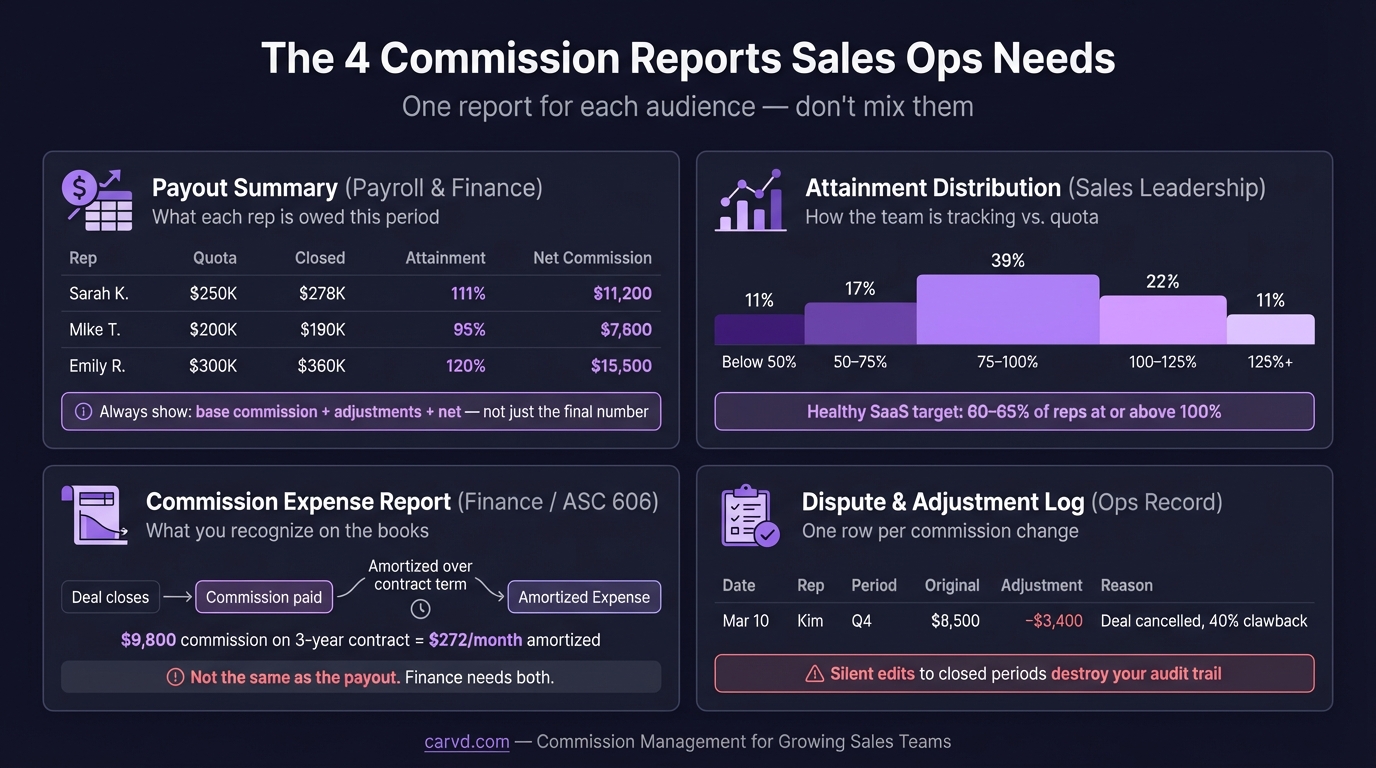
When reporting tries to serve all three groups with one document, it usually fails all three. The payroll summary is too aggregated for reps; the deal-level detail is too granular for finance.
The core commission reports
A functional commission reporting system needs at least four report types:
1. Commission statement (rep-level)
This is the document reps receive showing their payout for the period. It should include:
- Rep name, pay period, and plan name
- Every deal credited: name, close date, deal value, and commission amount
- Commission rate applied per deal (and which tier or product category, if applicable)
- Any adjustments: draws advanced or recovered, splits, clawbacks
- Net payout amount
Deal-level detail is the single most important feature. Without it, reps can't verify their number — and they will try, in their own spreadsheet. Xactly's 2017 survey of 240+ U.S. organizations found that 18% of companies provide no commission reporting to sales reps at all. Those are the companies with the most disputes.
2. Payout summary (manager-level)
A table showing every rep on the team: their quota, attainment percentage, gross commission earned, adjustments, and net payout. Useful for managers reviewing team-level spend before it hits payroll, and for spotting the occasional calculation error that individual rep statements might obscure.
3. Company payout report (finance-level)
Total commission expense for the period, broken down by department or cost center. Should reconcile to the individual statements: if the sum of all rep statements doesn't equal the company payout total, something is wrong. This reconciliation step is where most errors surface.
4. Commission reconciliation log
A record of every change made to the commission run — deals added, removed, or adjusted after the initial calculation, with a reason and timestamp. This log is what makes disputes resolvable. Without it, "the number was changed" has no paper trail.
What most commission reporting misses
In practice, most commission reporting processes have gaps in at least one of these areas:
No deal-level transparency for reps. The payout total is shared; the calculation behind it isn't. This is the root cause of most commission disputes. Reps who can't verify their number will either accept it and disengage, or dispute it and create work for sales ops. Neither outcome is good.
No interim tracking. Many companies run a single report at period-end. Reps have no visibility during the period into where they stand. The result is "shadow accounting" — reps maintaining personal spreadsheets to track their own expected earnings, which frequently diverge from the official calculation and produce disputes at month-end. Giving reps access to a rep dashboard with real-time deal-level visibility eliminates shadow accounting entirely — reps see their running total without building their own tracker.
Quota attainment not linked to commission reports. Commission reports and quota tracking often live in separate tools. Reps see their payout total but not their attainment percentage, which is the number they're actually managing to.
No reconciliation to prior period. Finance gets this period's total but not an explanation of why it's higher or lower than last period. If the variance is 25%, there's usually a good reason — but if that reason isn't documented, it creates unnecessary back-and-forth.
Late delivery. Xactly's 2017 survey found that 47% of companies take four or more weeks to process and pay incentive payouts. By then, the deals have been closed for weeks, and reps have moved on to the next period. Late commission statements are both harder to dispute and less motivating — they sever the connection between the sale and the reward.
Building commission reports that prevent disputes
The pattern behind most dispute-proof commission reporting:
Show the work. The formula that produced every dollar should be visible in the statement. Not buried in a footnote — visible at the deal level. "Deal: Acme Corp — ACV: $48,000 — Rate: 10% — Commission: $4,800" is reviewable. A lump sum of $11,200 is not.
Share early, finalize late. Send a preliminary commission report five to seven business days before period close. Label it clearly as a draft. This gives reps time to flag missing deals or incorrect amounts before the run is finalized — reducing the volume of post-finalization disputes significantly.
Define what counts. Commission reports should be downstream of a clear plan document. What revenue base is used? When does a deal get credited — contract signed, invoice issued, or cash collected? What happens to multi-year contracts? If those definitions are ambiguous, the same set of deals will produce different numbers depending on who's calculating.
Separate the calculation from the statement. The commission calculation (did the math work?) and the commission statement (does the rep agree with what was counted?) are different reviews. Confusing them creates situations where correct math produces disputed results because a deal was credited to the wrong rep.
Commission reporting at different company sizes
The right level of reporting infrastructure scales with team size and plan complexity.
Under 10 reps, one plan type: A spreadsheet with a deal-level tab per rep and a summary tab for payroll is functional. The process is manual, but the volume is low enough that errors are detectable. The gap is usually interim visibility — reps rarely see where they stand mid-period.
10-30 reps, 2-3 plan types: Spreadsheets start to show their limits. Managing multiple plan structures in a single workbook creates formula complexity that's hard to audit. This is where calculation errors compound and the commission reconciliation log is typically absent entirely. At this scale, tools like QuotaPath or Core Commissions can automate the calculation layer — though some teams find they're paying for features they don't need yet.
30+ reps or complex plans: Manual processes consistently break down at this scale. Xactly's 2018 survey of 200+ companies found that 83% of companies have payment inaccuracies, with an average error rate exceeding 5%. The companies in that range with the fewest disputes share one characteristic: reps can see their own calculation at the deal level without asking sales ops.
What to build toward
The goal of commission reporting isn't just accuracy — it's trust. Reps who trust the process don't shadow-account. Disputes don't happen when reps can verify their own number in three minutes. Finance doesn't push back when the reconciliation matches.
That trust is built with three things: deal-level statements that show the calculation, interim visibility during the period so there are no surprises at month-end, and a reconciliation log that explains every adjustment.
For most teams, getting to that standard requires either building more structure into existing spreadsheet processes or moving to dedicated commission software. Tools like Carvd generate deal-level commission statements automatically from your CRM data, so every rep can see exactly how their payout was calculated — without a spreadsheet or a question to sales ops.
Related reading:
Last updated: March 22, 2026