Commission Automation: When Spreadsheets Stop Scaling
Commission automation replaces manual spreadsheet calculations with software that handles the full cycle. Here's when it makes sense and what the transition looks like.
Commission automation means using software to replace the manual steps in a commission workflow: exporting deals from the CRM, running spreadsheet formulas, chasing down data inconsistencies, and answering rep questions about what they'll earn. The goal is a system where those steps happen automatically as deals close, without ops intervention.
This guide covers what commission automation actually does, the specific signals that tell you it's time to move off manual processes, and how to evaluate tools when you get there.
What commission automation does
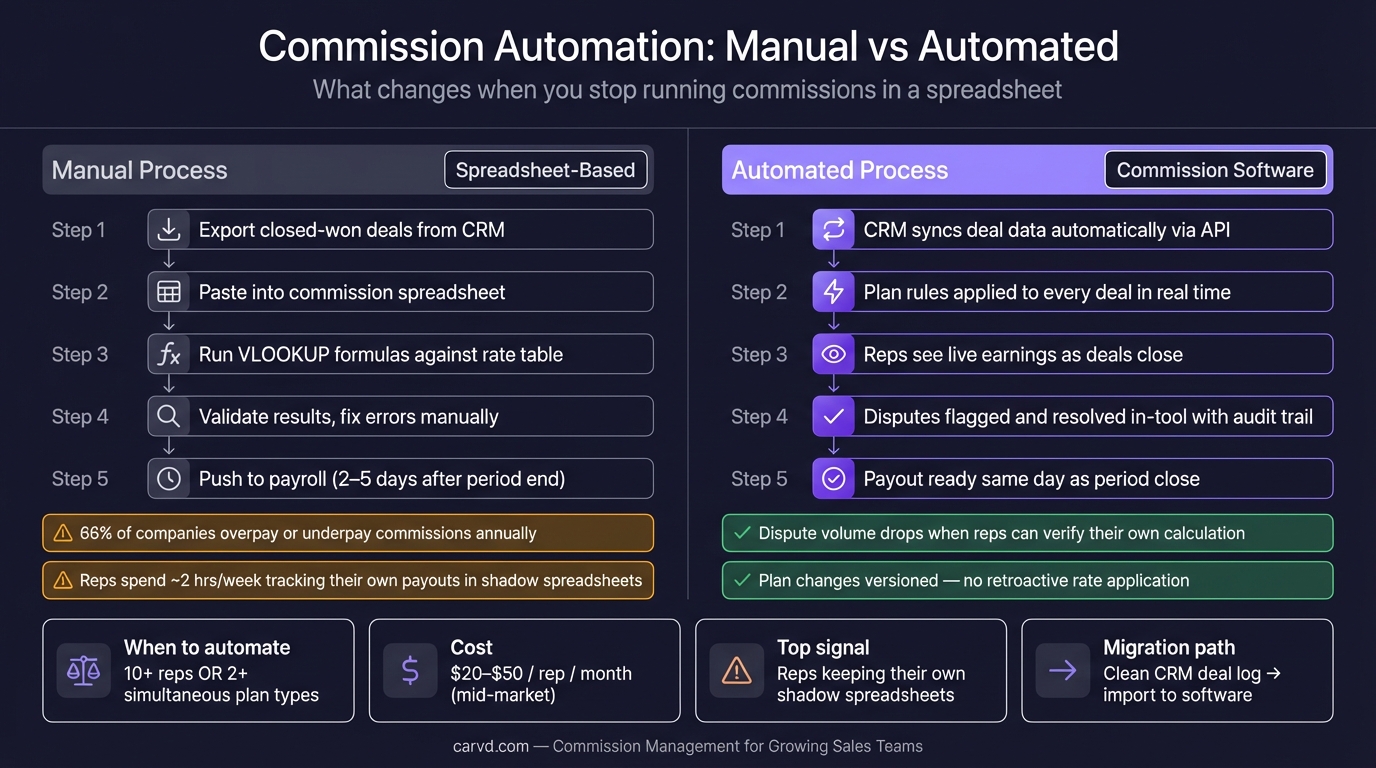
A manual commission process has several distinct steps, each of which can fail:
- Export closed-won deals from the CRM at period end
- Paste them into the commission spreadsheet
- Run formulas against a rate/quota lookup table
- Validate that the results look right
- Handle disputes from reps who disagree with their numbers
- Push final amounts to payroll
Commission automation replaces steps 1–4 with a continuous process. The software connects to your CRM via API, pulls deal data as it's created and updated, applies your commission plan rules automatically, and maintains a running payout calculation that's visible to both reps and ops teams throughout the period.
What this changes in practice:
- Reps see what they'll earn as deals close, not two days after period-end
- Data validation happens continuously, not as a one-time panic at period close
- Plan rules are encoded once and applied consistently — no lookup formula errors, no stale rate tables
- Dispute volume drops because reps can see exactly how their number was calculated
What automation doesn't fix: bad deal data in your CRM, ambiguous plan terms, or disputes about whether a particular deal qualified. Those require human judgment. Automation is better than a spreadsheet at everything except the judgment calls.
Signals that manual processes have hit their limit
These signals appear in a predictable order as team size and plan complexity grow. None of them mean the spreadsheet was wrong to use — most teams start there and should. They mean you've crossed a threshold.
1. Reps are keeping shadow spreadsheets
Shadow accounting — where reps independently track their commissions to verify the official payout — is the clearest signal that the commission process has lost the team's trust. Research from Forma.ai found that reps spend an average of two hours per week on shadow accounting in companies without automated commission tools.
Two hours per rep per week is not a rep problem. It's a signal that the ops system can't be verified independently. When the commission process is automated and reps can see their own calculation logic, shadow accounting drops because there's nothing to verify manually — the work is already done.
2. Closing books takes more than two business days
A commission close should take one business day: pull data, run calculations, review for outliers, push to payroll. If it's taking three, four, or five days, the manual review burden has scaled past what the process can handle.
The cost isn't just ops time. A slow close means a delayed paycheck or a paycheck issued before disputes are resolved. Both create friction.
3. You've had disputes that took more than an hour to resolve
A single commission dispute that requires more than an hour to investigate — pulling deal records, cross-checking rate tables, verifying which plan version was in effect — suggests the data trail isn't good enough. When everything is versioned and logged in commission software, most disputes resolve in minutes: the rep can see the calculation, and the discussion is about whether the underlying deal data is right, not whether the formula was applied correctly.
4. A plan change requires updating formulas in more than three places
When your commission rate changes, how many cells or named ranges need to be updated? If the answer is more than three, a missed update is an eventual certainty. Commission software encodes plan changes as versioned records with effective dates — the rate that applies to a deal in March is always the March rate, regardless of what changes happen in April. Carvd's comp plan builder lets you model tiered and per-product structures without spreadsheet formulas, with versioning built in.
5. You're running simultaneous plan types
An SMB flat-rate plan, an enterprise tiered plan, and a quarterly SPIFF running at the same time create branching logic that spreadsheets handle poorly. Each plan type needs its own lookup structure, and deals need to be correctly classified before any formula runs. Commission software handles this through plan configuration — you define which plan applies to which reps under which conditions, and the software applies the right one to every deal automatically.
What to look for in commission automation software
CRM integration depth
The most important integration is with your CRM, because deal data is the input to every commission calculation. Evaluate whether the integration is native (a certified connector that syncs in real time) or export-based (you upload a CSV manually or on a schedule).
Native integrations surface data problems earlier. Export-based integrations are better than nothing, but they recreate part of the manual process they're meant to replace.
Also evaluate what deal fields are available. If your commission plan uses custom CRM fields (deal type, territory, product line), confirm the integration can pull those — not just standard fields like deal value and close date. If you're not on a supported CRM, a clean CSV deal import is the practical fallback.
Plan rule expressiveness
Commission plans have a long tail of edge cases: partial-year ramp schedules, split credits, clawback recovery windows, minimum draw guarantees, quota-relief periods. Evaluate whether the software can encode your actual plan rules, not a simplified version of them.
The clearest test: describe your most complex plan scenario to the vendor and ask them to show you how it's configured. If the answer requires workarounds or manual overrides, those are future error points.
Rep-facing visibility
Commission automation's trust benefit only materializes if reps can see their own calculations. Look for a rep-facing view that shows each deal, the commission it earned, which plan rule applied, and the running total for the period. This is what eliminates shadow accounting.
Dispute workflow
Even in automated systems, disputes happen. The question is how they're handled. Look for a structured workflow: rep flags a discrepancy, ops reviews and responds, resolution is logged. Disputes resolved through email chains are not auditable and tend to resurface.
Audit trail and period locking
Once a period closes, the underlying deal data and commission calculations should be locked — no silent edits after books close. An audit trail that shows who changed what, and when, is the difference between a commission system that can be trusted and one that can be questioned.
For the full evaluation framework across specific tools, see commission tracking software: buyer's guide (2026).
The ROI calculation
Commission automation has a straightforward cost structure: per-rep monthly software fees, typically $20–$50/rep at mid-market price points. For a 15-rep team, that's $3,600–$9,000/year.
The offset comes from three places:
Ops time recovered. Estimate how many hours go into commission administration each month: CRM exports, formula runs, validation, rep questions, dispute resolution. Multiply by a fully-loaded hourly cost. For most teams operating a spreadsheet above 10 reps, this is 15–30 hours per month — $1,500–$3,000/month at $100/hour fully loaded.
Error cost reduction. Use the commission calculator to spot-check your current payouts against what automation would produce. According to CaptivateIQ's 2025 State of Incentive Compensation Management Report, 66% of companies reported overpaying and/or underpaying commissions in the prior year. The cost of a single overpayment discovered after payroll runs — clawback conversation, rep friction, potential attrition — often exceeds a month's software fee.
Time to investigate disputes. If your current process requires two hours to investigate a dispute, and you have four disputes per month, that's eight hours of ops time that mostly disappears with automation.
Most teams find the math favors automation somewhere between 10 and 20 reps, assuming the plan has at least moderate complexity (more than a single flat rate). A 5-rep team on a flat-rate plan can run a spreadsheet indefinitely with minimal risk.
Getting started with automation
The highest-value starting point is usually not switching software — it's cleaning the underlying data. Commission software is only as accurate as what it imports from your CRM. Before migrating:
- Audit that closed-won deals have accurate deal values, close dates, and owner assignments
- Confirm that deal type or product fields are populated consistently (if your plan uses them)
- Verify that rep and quota data is current in your HRIS
A clean CRM export is also the best migration path. If you're still in spreadsheets, start with a Stackrows commission template before automating. If you've been tracking deals in a commission spreadsheet, the deal log maps directly to what most commission software expects to import.
For the calculation methods that commission software automates, see commission formulas for every plan type. For common errors that accumulate in manual processes and that automation prevents, see commission errors: the most common mistakes.
Carvd connects to your CRM, applies your commission plan rules, and gives reps a real-time view of their earnings without waiting for period close. If you're running a 10–100 rep sales team on a spreadsheet and spending more than a day each period on commission administration, it's worth a look.
Related reading
- Commission tracking software: buyer's guide (2026) — how to evaluate commission software and compare the major tools
- Commission spreadsheet: free template + why you'll outgrow it — building a commission tracking spreadsheet and recognizing its limits
- Commission errors: the most common mistakes — the six error types that manual processes consistently produce
- Commission reporting: what sales ops actually needs — the four reports every ops team needs and how to keep them accurate
Last updated: March 22, 2026